How to Reduce Manual Invoice Processing (Before Invoices Ever Arrive)

How to Reduce Manual Invoice Processing (Before Invoices Ever Arrive)
Manual invoice processing costs organizations an average of $12.88 per invoice and takes up to 17.4 days to complete, according to Ardent Partners. Automation cuts both numbers by roughly 75%.
The default fix is to automate downstream—scanning documents, matching purchase orders, and resolving exceptions. But the faster path is stopping the work from being created in the first place: by capturing clean, coded invoice data at the moment of purchase, before the invoice ever lands in AP.
Key takeaways: How to reduce manual invoice processing
- Most invoice errors originate at the point of purchase, and catching them before they reach AP is more efficient than fixing them downstream.
- Standardizing requisitions, approvals, vendor data, and coding rules helps reduce the missing POs, unauthorized spend, and GL coding gaps that create manual work later.
- AI can help prevent invoice exceptions by flagging pricing discrepancies, unusual spend patterns, and budget risks while the purchase is still in motion.
- OCR and data extraction tools reduce manual data entry, but they don’t solve the root problem: unstructured invoice data arriving from inconsistent sources.
- Order.co embeds purchasing guardrails into everyday buying, helping teams structure spend at the source so AP receives cleaner data, fewer exceptions, and less manual cleanup.
Download the free ebook: How Automation Can Solve Finance Teams’ Biggest Challenges
What causes manual invoice processing bottlenecks?
Invoice problems rarely start in accounts payable. They begin weeks earlier, when someone places an order without the right approvals, skips a PO number, or uses a vendor that isn't set up in your system. By the time the invoice arrives, the damage is already done.
The downstream symptoms may sound familiar:
- Invoices that don't match POs
- Missing GL codes
- Approval chains that stall because no one knows who authorized the spend
- Optical character recognition (OCR) tools that can't read poorly formatted PDFs
Each mismatch triggers time-consuming manual follow-up, slowing the process. In multi-location organizations, the problem compounds.
When manual purchasing flows through fragmented systems, there's no shared record of what was ordered, no standardized coding, and no way for procurement to catch errors before they reach accounts payable. This delays financial close, strains cash flow, and frustrates AP staff.
How Automation Can Solve Finance Teams’ Biggest Challenges
Take a few pages out of WeWork’s playbook and learn how automation can solve some of the greatest challenges facing your finance team.
How upstream purchasing controls reduce manual invoice processing
To reduce manual invoice processing, you have to prevent the errors that create it. Many teams invest in downstream automation solutions, such as document scanning, PO matching, and exception resolution. But if the purchase wasn't structured correctly from the start, downstream cleanup becomes unavoidable.
Upstream guardrails shift that dynamic entirely by building compliance into the workflows your teams already use.
Standardized purchase requisitions and approvals
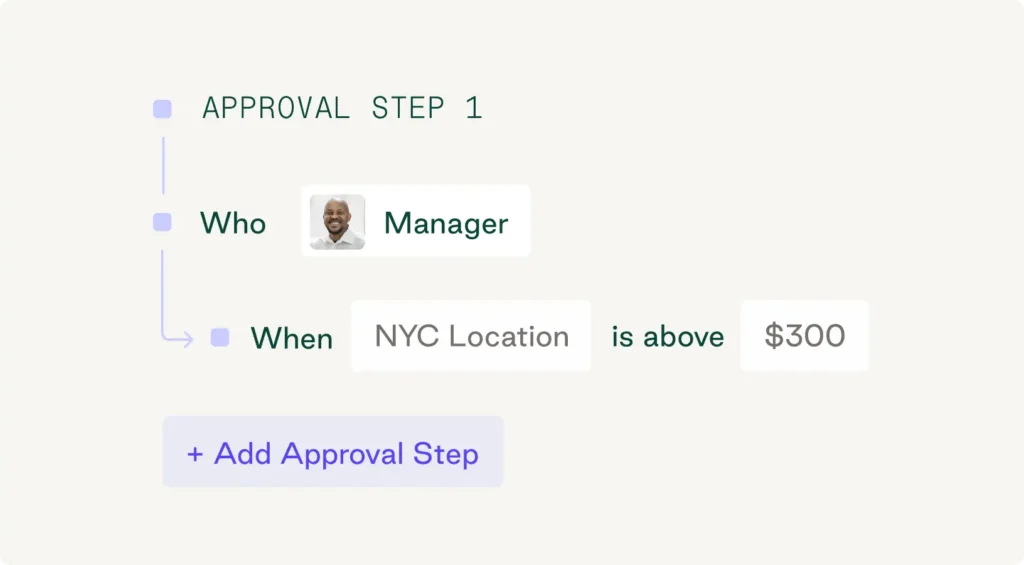
Most invoice errors trace back to the moment someone placed an order without the right budget checks or vendor information. Standardizing how purchase requests are submitted and approved eliminates this cause.
A standardized requisition process ensures every purchase follows the same path, regardless of who's ordering or their location. You define approval thresholds based on spend amount, department, or vendor type, and your procurement software automatically routes requests, preventing unauthorized purchases from slipping through.
If your policy requires finance approval for any purchase over $5,000, the system automatically routes those requests before a PO is issued, with full context for the approver and no way for the requester to bypass the step.
Centralized vendor and contract management
Scattered vendor relationships create invoice problems at scale. When teams buy from different supplier accounts, use inconsistent payment terms, or rely on outdated pricing agreements, AP has to reconcile invoices that don’t match the original purchase context.
Centralizing vendor and contract management gives procurement and finance a single source of truth for supplier information, approved items, pricing agreements, payment terms, and coding rules. That reduces the risk of invoices from unknown vendors, incorrect billing rates, or manual follow-up to confirm who approved the purchase.
The strongest platforms take a vendor-agnostic approach, letting teams buy through a pre-vetted supplier network while still bringing their own vendors into the same controlled workflow. That flexibility helps teams preserve existing supplier relationships while standardizing the vendor data, pricing, and payment expectations AP will later depend on. Order.co supports this model with a network of 40,000+ vendors and the option to bring your own vendors into the platform.
Embed match accuracy at the point of purchase
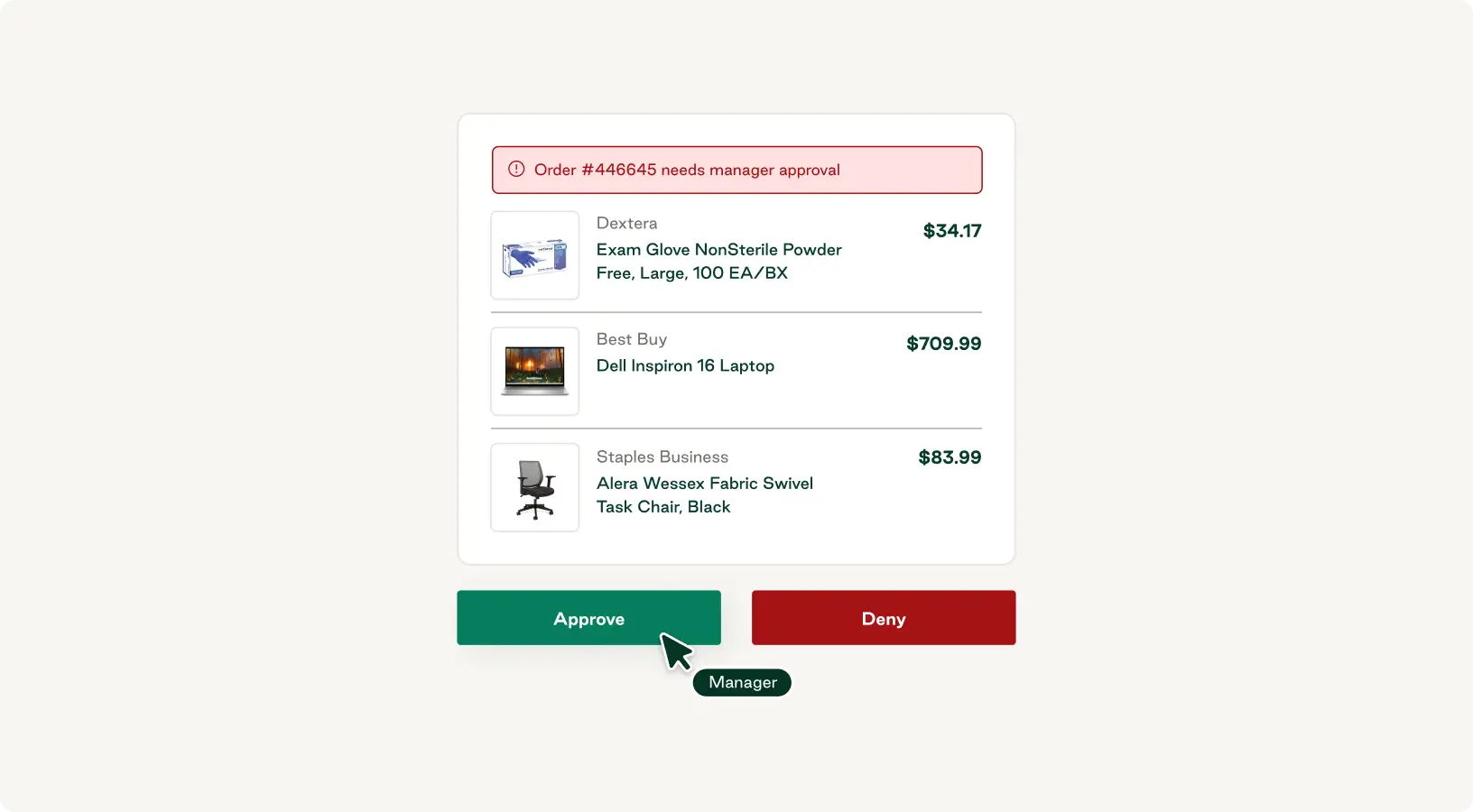
The strongest AP automation platforms work upstream, embedding accuracy at the moment of purchase so the invoice data problem never occurs in the first place. When purchasing flows through a single platform:
- Products are selected from a curated catalog of pre-approved vendors and items
- GL codes, cost centers, and entity tags are applied at the line-item level as the order is placed
- Approvals and budget checks validate the request before the PO is issued
By the time AP sees the invoice, every line item is already approved and coded. There's no PO-to-invoice matching work to do, because the invoice arrives in a structured, verified state. The key is eliminating the conditions that require matching rather than automating the match itself. This is the model Order.co is built around: purchasing and AP working from the same data, captured once at the source.
Use AI to prevent invoice exceptions before they reach AP
Even with structured purchasing workflows, some risks are difficult to catch manually: a vendor price that has drifted from expected terms, a purchase that looks unusual for a specific location, or a category that is trending over budget before month-end.
AI can help procurement teams surface those issues while the purchase is still in motion. By flagging pricing discrepancies, unusual spend patterns, and budget risks before an order is placed, teams can correct potential problems before they become invoice exceptions.
That matters for manual invoice processing because AP spends less time investigating mismatched amounts, unclear approvals, missing context, or off-policy purchases after the invoice arrives. The more issues procurement can catch at the point of purchase, the cleaner the invoice data AP receives later.
The limits of downstream invoice automation
Upstream controls reduce many of the issues that create manual invoice work, but many teams still rely on downstream automation to handle invoices after they arrive. Those tools can help, but they have limits when the underlying purchase data is incomplete or inconsistent. Understanding their limitations matters before you invest.
OCR and data extraction
Optical character recognition (OCR) technology reads invoice documents and extracts key fields into your AP system or ERP. For teams processing high volumes of vendor invoices with consistent formatting, it's a meaningful step forward from manual processing.
The limitation is accuracy. OCR depends entirely on what it's reading. Clean, consistently formatted invoices process well; low-quality scans or PDFs with inconsistent layouts don't. OCR can also introduce errors, such as misread figures, transposed digits, or mis-mapped fields, which propagate into accounts payable processes and require manual correction.
Even when OCR works perfectly, you still need manual intervention to match invoices to POs and receipts and validate GL codes.
Handling exceptions when they happen
Even with strong upstream controls, exceptions happen. A vendor might ship the wrong quantity, a price might change after the PO is issued, or a rush order might bypass normal approval flows. The goal is to route exceptions efficiently so they don't stall the rest of the AP process.
A well-designed exception handling system answers four questions:
- What qualifies as an exception? (quantity discrepancies, price variances, missing approvals, off-catalog purchases)
- Who reviews it — based on category, spend level, or vendor?
- How quickly does it need to be resolved?
- Why was it flagged?
When exceptions are the outlier rather than the norm, your AP team can focus on resolving real issues and avoiding late payments instead of chasing routine errors. And when the same vendor or category keeps triggering manual review, that's a signal to adjust vendor onboarding or work with the supplier to standardize their invoicing.
How Automation Can Solve Finance Teams’ Biggest Challenges
Take a few pages out of WeWork’s playbook and learn how automation can solve some of the greatest challenges facing your finance team.
"*" indicates required fields
Measuring the impact of reduced manual invoice processing
Reducing manual invoice processing only delivers lasting value if you're tracking the right metrics. High-level cost savings matter to CFOs and leadership, but the metrics that actually tell you whether your process is working are more granular.
Organizations that shift controls upstream often see meaningful reductions in processing time, error rates, and exception volume compared to fully manual workflows. A 2025 study found that switching from manual to automated invoice processing reduced invoice error rates by more than 80% within 12 months of implementation, dropping from 6.7% to 1.3%.
Duplicate payments also decreased from 1.9 to 0.2 per 1,000 invoices, saving an estimated $460,000 per year across all firms studied.
Three measures give you the clearest picture of impact:
- Processing time per invoice is the most direct indicator. When you eliminate the need to chase missing POs, correct GL codes, or resolve vendor mismatches, the processing timeline decreases significantly. Track cycle time from order placement to payment approval to capture the full effect of upstream controls.
- Error rates and exception volume tell you whether your system prevents problems or just moves them around. When purchasing flows through a structured system with built-in approvals and budget checks, exception rates drop substantially, and you can focus on resolving real issues rather than chasing routine errors.
- Policy compliance rates reveal where your process breaks down under pressure. A centralized purchasing system gives you visibility into how often purchases bypass required approvals, exceed budget allocations, or go to non-preferred vendors—information that's nearly impossible to track when purchasing happens through email and spreadsheets.
Real-time analytics tools let you see which vendors consistently deliver on time, where budget overruns are occurring, and how purchasing behavior varies across teams without building custom reports or manually exporting data. That visibility makes it easier to refine your upstream controls and demonstrate measurable impact to leadership.
Reduce manual invoice processing with Order.co
Reducing manual invoice processing starts with improving the information AP receives. Downstream tools like OCR, matching engines, and exception queues begin after the invoice arrives. At that stage, AP still has to interpret, validate, and reconcile information that may already be incomplete, inconsistent, or disconnected from the original purchase.
Purchasing guardrails address those issues earlier by guiding buyers toward compliant decisions before an order is placed. Order.co embeds purchasing guardrails into everyday buying, so spend is structured and routed correctly at the source, giving AP cleaner data, fewer preventable exceptions, and less manual work to resolve. AI-powered insights add another layer of control by surfacing pricing drift and unusual spend patterns while there’s still time to act.
Book a demo to see how Order.co helps turn invoice processing from a recurring bottleneck into a cleaner outcome of better purchasing.
FAQs about how to reduce manual invoice processing
Most organizations can automate a majority of invoice processing, but the ceiling depends on how standardized their purchasing workflows are. Higher automation rates come from placing controls upstream before invoices arrive, rather than relying only on downstream tools like OCR. When purchase data is structured at the point of order, AP has fewer details to extract, match, or manually reconcile after the invoice arrives. Email-based, fragmented purchasing workflows tend to create more exceptions, limiting how much of the process can be automated.
Implementation timelines range from a few weeks to several months, depending on whether you're automating downstream tasks or improving the purchasing workflow that creates invoice data in the first place. OCR and data extraction tools may deploy quickly, but they often require ongoing tuning and exception handling. Platforms that embed guardrails into everyday buying, like Order.co, help teams keep the vendors and buying motions they already use while adding structure around approvals, coding, and invoice context. That reduces manual cleanup once invoices reach AP.
The biggest challenge is that most teams automate the wrong part of the process. Downstream tools like OCR reduce data entry time but don't address the root cause: unstructured invoice data arriving in AP. Mismatched POs, missing approvals, and inconsistent GL coding still require manual review. The other challenge is getting organizational buy-in to shift purchasing workflows upstream, where errors can actually be prevented.
Get started
Schedule a demo to see how Order.co can simplify buying for your business.
"*" indicates required fields