How to Spot Maverick Buying and Fix Spend Control Fast

How to Spot Maverick Buying and Fix Spend Control Fast
Maverick buying isn’t usually malicious. It happens when your approved procurement process feels slower or harder than the workaround. When employees have to choose between speed and compliance, speed typically wins.
A store manager pays a vendor directly because the approved process would take two days. A software subscription auto-renews without a PO in sight. By the time finance catches these issues, the quarter's already closed. Until you fix the underlying friction, policies alone won't solve the problem.
Preventing maverick buying without slowing down the business means making compliant purchasing easier from the start. This guide explains why rogue spend happens, what it costs, how to spot it earlier, and how modern procurement platforms help reduce it by embedding controls directly into the buying process.
Maverick buying key takeaways
- Maverick buying refers to any purchase your team makes outside your established procurement process.
- It persists because compliant purchasing is often more difficult and slower than going rogue.
- The real costs of maverick buying go beyond individual transactions: missed volume discounts, vendor sprawl, extended month-end close, and audit exposure.
- Sustainable maverick buying prevention requires you to embed approvals and budgets into the buying workflow itself—not add more enforcement layers on top of a broken process.
- Centralized purchasing solutions like Order.co help reduce maverick buying by automatically guiding users towards pre-approved supplier lists and products.
Download the free guide: Spend Analysis Toolkit
What is maverick buying in procurement (and how do you spot it)?
Maverick buying is any purchase your team makes outside your established procurement process, whether an employee pays a vendor directly with a personal card, uses an unapproved supplier, or skips the purchase order system entirely.
Research suggests that organizations can lose 10–20% of their negotiated savings due to maverick buying. The issue isn't the vendor or the price. It's that the purchase bypassed your system and left no trail for your purchasing department to follow.
You'll spot it in a few consistent places. For example, if you see "ABC Supply," "ABC Supply Co," and "ABC Supply - Phoenix" as separate accounts, someone has bypassed your approved vendor list. Surprise invoices during month-end close signal another clear problem, especially when AP has no matching PO or approval trail. Budget variances that you can't trace back to approved purchases point to the same issue.
The pattern becomes obvious in your AP workflow. If your team regularly chases receipts, requests GL codes after the fact, or reconciles invoices nobody authorized, that's maverick buying showing up as manual work that shouldn't exist.
Spend Analysis Toolkit
Unlock savings, improve supplier relationships, and make smarter procurement decisions with clearer spend insights. Download the ebook to get started.
Maverick buying vs. tail spend vs. off-contract spend: Key differences
Maverick buying, tail spend, and off-contract spend are often used interchangeably, but they describe different spending problems that need different fixes.
Here are the key differences:
- Maverick buying is about process violations. A store manager pays a vendor directly with a personal credit card instead of submitting a purchase request. It doesn't matter if you approved the vendor or the price is fair—the purchase bypassed your system.
- Tail spend refers to the low-value, high-volume purchases that, individually, seem insignificant but collectively drain resources. Think office supplies, cleaning products, or small maintenance items that your team spreads across dozens of vendors. Understanding indirect buying patterns is often the first step toward getting it under control.
- Off-contract spend happens when you buy from approved vendors under expired or non-existent agreements. Your team orders from a supplier you've worked with for years, but the negotiated pricing lapsed six months ago. You're paying list price instead of your contracted discount, and nobody noticed because the vendor relationship feels "approved."
These categories overlap constantly. That emergency office supply order from an unapproved vendor? It's maverick buying and tail spend. The software renewal that auto-charged your card after the contract lapsed? Off-contract spend that became maverick buying because it bypassed your approval workflow.
The distinction matters because each requires a different fix:
- Maverick buying requires better purchasing workflows
- Tail spend requires vendor consolidation
- Off-contract purchases require proactive contract management and renewal tracking
Most central procurement teams face all three at once, which is why a unified procure-to-pay platform that addresses purchasing, approvals, and supplier relationships together works more effectively than solving each problem separately.
Why does maverick buying happen even with approved suppliers and purchasing policies?
When your procurement process requires multiple approval emails, manual PO creation, and waiting days for sign-off, employees will naturally find faster paths. They'll use a personal credit card, call a vendor directly, or place an order through a supplier's website.
This friction compounds across locations. Let’s say a regional manager needs cleaning supplies for three stores by tomorrow. The approved process involves finding the right vendor code, completing a requisition form, and waiting for central approval. Or, they can call the local supplier they've used before and have it delivered this afternoon.
It’s not that they’re intentionally being reckless—it’s more likely that they’re trying to be efficient. This is why policy enforcement alone doesn't solve maverick buying: it only adds friction to an already broken workflow.
Order.co's approach recognizes that true maverick spend control happens at the moment of purchase, not after. When compliant purchasing runs as fast and intuitively as online shopping, employees don't need to go rogue.
What are the business impacts of maverick buying?
The real cost of maverick buying isn't the individual purchase. It's everything that purchase breaks downstream—the financial, operational, and compliance problems it creates.
- Missed volume discounts and pricing leverage: Every time someone buys from an unapproved vendor, you lose negotiating power. If five locations order cleaning supplies from different vendors, you're paying retail prices five times over instead of consolidating that spend for better terms.
- Duplicate vendor relationships and payment overhead: Maverick buying creates vendor sprawl, leading to multiple accounts for the same category, each requiring separate onboarding, payment terms, and AP processing. Integrating supplier enablement into your procurement strategy can help you consolidate these relationships before they get out of hand.
- Extended month-end close and manual reconciliation: When purchases happen outside your system, AP scrambles to track down receipts, match invoices to transactions, and code everything correctly before close.
- Audit and compliance risks: Maverick buying creates serious exposure during audits or due diligence, especially for multi-location operators. If you can't trace purchases back to approved budgets and vendors, you face vulnerability.
The hidden cost is the time your finance team spends chasing down information instead of analyzing it. When procurement happens outside your system, you don’t just lose money on each transaction—you lose the ability to make informed decisions about where your supply chain budget actually goes.
How do you prevent and control maverick buying without slowing down the business?
You shouldn't have to choose between speed and control. Sustainable maverick spend prevention requires you to embed approvals and budgets directly into everyday purchasing workflows, not pile on more approval layers.
1. Diagnose root causes with spend visibility and stakeholder input
Before you can fix maverick buying, you need to see where and why it's happening.
Pull complete spend data and look for patterns such as:
- Which departments have the highest volume of non-PO purchases
- Whether certain vendor categories consistently bypass your system
- Whether rogue purchases spike at specific times of the month
Maverick buying typically clusters around specific pain points, so talk to the people actually making purchases. Ask site managers, department heads, and AP staff what makes them go around the system.
Complete spend visibility means you connect data from credit cards, check payments, direct vendor invoices, and approved purchase orders into one unified view. Without this baseline, you’re forced to guess at the scope of the problem.
2. Fix the buying experience with guided purchasing and fast approvals
To reduce maverick buying most effectively, fix the buying experience itself. When procurement feels as easy as consumer shopping, compliance becomes the default path.
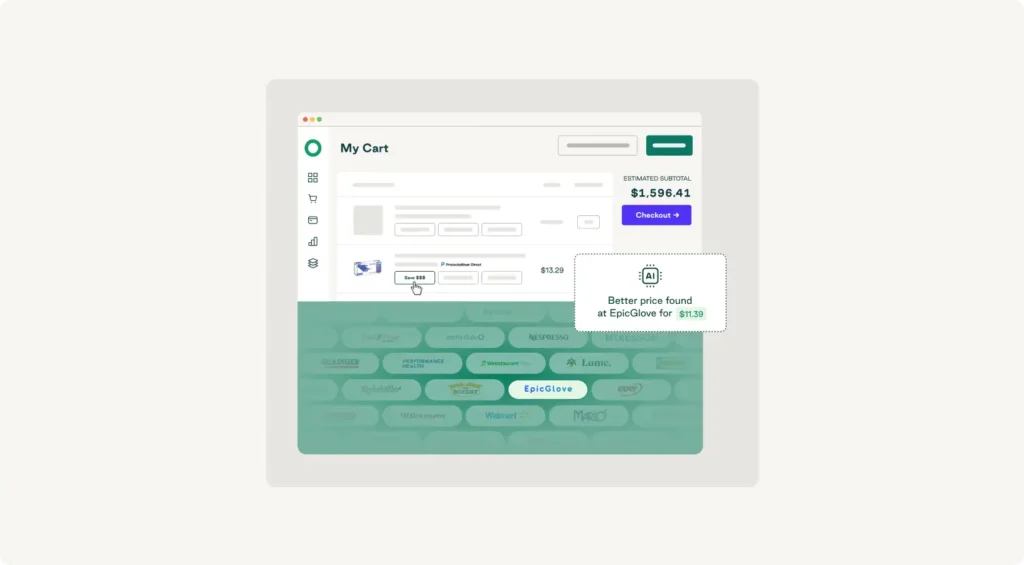
What this looks like in practice:
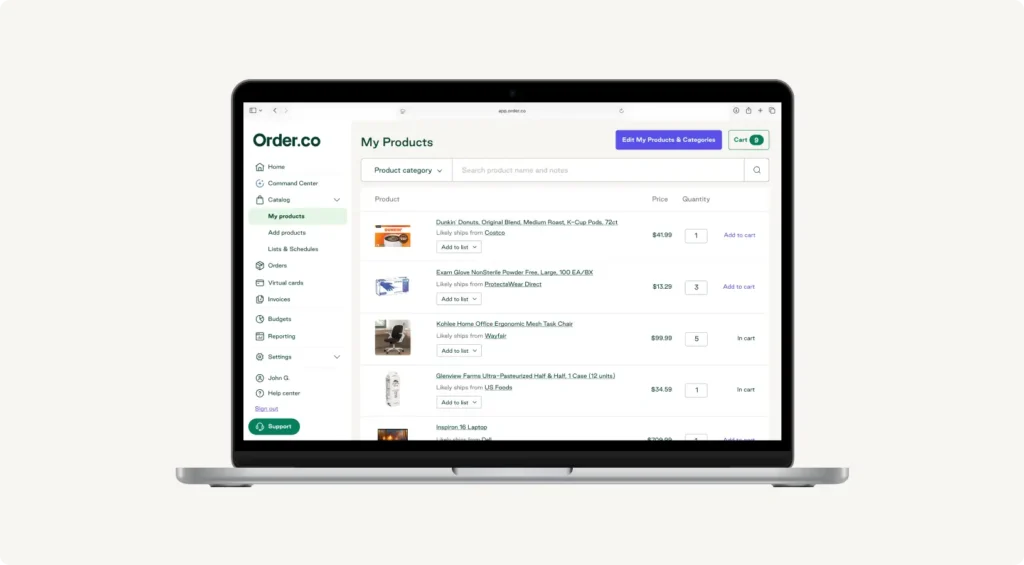
- Single vendor catalog: Your procurement software platform consolidates all your vendors, so teams find what they need without hunting through multiple systems.
- Automated PO creation: Buyers get what they need quickly while finance gets the documentation they require.
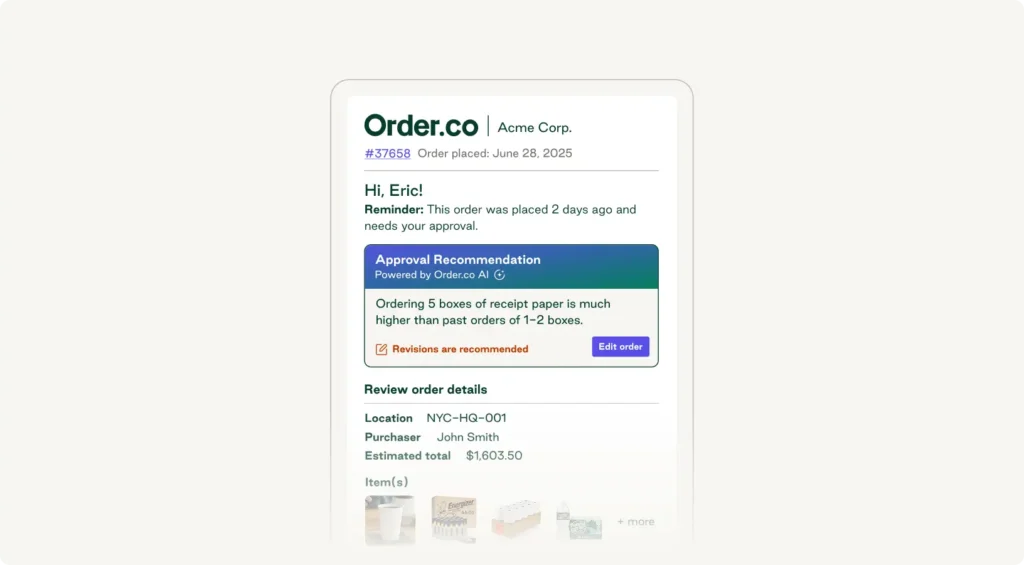
- Real-time approvals: Managers review and approve requests in seconds through Slack or email, from wherever they're working.
- Embedded budget checks: You catch issues at the point of purchase, before they become surprise invoices.
CorePower Yoga used this approach across 200+ studio locations. By introducing Order.co to achieve 100% line-level visibility, they eliminated all monthly unapproved spending—resulting in annual cost savings of $55K. The key wasn't stricter enforcement—it was removing the friction that made maverick buying feel necessary.
Spend Analysis Toolkit
Unlock savings, improve supplier relationships, and make smarter procurement decisions with clearer spend insights. Download the ebook to get started.
"*" indicates required fields
3. Sustain compliance with controls, KPIs, and supplier management
Making compliant purchasing easy is step one. Keeping it that way requires the right controls and ongoing visibility.
Implement point-of-purchase controls. Use real-time budget tracking to stop overspending before it happens—not after someone submits an expense report. Set spending limits by location, business unit, or category to flag expenditures exceeding thresholds before orders go through.
Track leading indicators of maverick spend, such as:
- Percentage of purchases your team makes through approved procurement channels
- Average time from request to approval
- Number of new vendors you add each month
Maintain your approved vendor list. Even with approved vendors, negotiated contracts and framework agreements expire. You may also add new suppliers without proper vetting. Failure to ensure close contract governance can result in a 40% loss in value. A centralized vendor management system that tracks contract terms, renewal dates, and performance metrics keeps your list current—and gives your team less reason to go outside it.
Review purchasing patterns quarterly to spot trends, and use that data to fix root causes rather than just flag violations. Order.co embeds these controls directly into the buying workflow, so compliance happens automatically rather than through manual enforcement.
Get maverick buying under control for good
Maverick buying doesn't disappear because you've written better procurement policies or added more approval steps. It persists because the underlying friction in your purchasing process remains unchanged.
Order.co consolidates all your preferred suppliers into a single catalog, embeds budget checks and approvals directly into the buying workflow, and automates PO creation and invoice management. The outcome is fewer surprise invoices, better pricing through consolidated vendor relationships, faster month-end close, and the spend visibility that helps you make smarter decisions about where your budget actually goes.
If you're ready to reduce maverick buying without adding friction to daily operations, schedule a demo to see how Order.co helps manage vendors, embeds approvals into your workflow, and gives you real-time spend visibility.
FAQs about maverick buying
Get started
Schedule a demo to see how Order.co can simplify buying for your business.
"*" indicates required fields