5 Best Purchase Order Management Software for Growing Businesses

5 Best Purchase Order Management Software for Growing Businesses
Every growing business reaches a tipping point where manual purchase orders become a liability instead of a formality. Spreadsheets need to be constantly updated, approvals get stuck in email threads, and finance teams spend more time tracking down paperwork than analyzing spend. The question isn't whether to invest in purchase order management software — it's how to choose the right one before inefficiency compounds.
This guide breaks down the key signs that your current process has outgrown manual methods, the concrete benefits of PO management software, and the five best platforms for mid-size and large businesses. It also includes the questions you should ask on every demo call, so you walk away with a clear winner.
Ready to see PO management that actually works? Tour Order.co in under 2 minutes
5 signs your business needs purchase order management software
Not every company needs a dedicated PO platform on day one. But if any of these scenarios sound familiar, manual processes are likely costing more than the software would.
1. Approval bottlenecks are delaying purchases
When purchase requests sit in someone's inbox for days — or get approved verbally with no documentation — teams either wait too long for critical supplies or bypass the process entirely. Both outcomes erode financial controls and slow operations.
2. Duplicate orders and data entry errors are recurring
Manual PO creation invites mistakes: wrong quantities, duplicate entries, and miskeyed vendor details cascade into invoice mismatches, overpayments, and time-consuming reconciliation work during month-end close.
3. Spend visibility is limited or delayed
Can your finance team answer "How much did we spend on office supplies across all locations last quarter?" in under five minutes? If the answer is no, decentralized purchasing is creating blind spots that prevent potential cost savings.
4. Vendor management is scattered across channels
When purchase orders live in email threads, phone calls, and disparate spreadsheets, tracking order status and resolving disputes becomes a manual scavenger hunt. This fragmentation strains vendor relationships and creates compliance gaps.
5. Your team is growing faster than your processes
Rapid expansion — especially across multiple locations — amplifies every inefficiency in a manual PO process. What works for a 10-person team breaks down at 50, and collapses entirely at 200+.
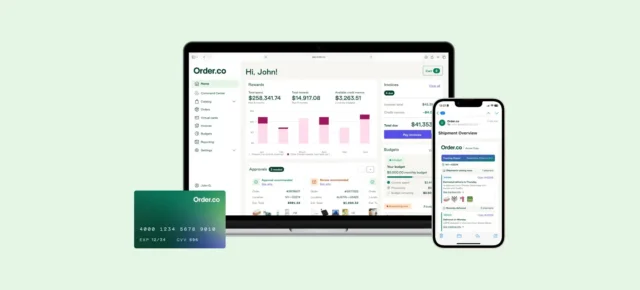
See PO management that works for your team
Tour the product on your own time, at your own pace — no sales call required.
Key benefits of purchase order management software
The right PO management platform doesn't just digitize paperwork — it transforms purchasing into a controlled, visible, and strategic function. Here's what that looks like in practice.
- Fewer errors, faster processing: Automated PO generation eliminates manual data entry mistakes and speeds up the requisition-to-order cycle. Pre-populated fields, auto-generated PO numbers, and digital routing reduce the risk of duplicate orders and miskeyed information.
- Real-time spend visibility: Every purchase is logged and categorized the moment it's submitted, giving finance teams an up-to-the-minute view of spending by department, location, vendor, or GL code. This visibility enables proactive budget management instead of reactive month-end scrambles.
- Stronger compliance and audit trails: Digital approval workflows enforce spending policies automatically. Every approval, modification, and submission is timestamped and recorded, creating a complete audit trail that simplifies compliance reviews.
- Better vendor relationships: Standardized POs with accurate quantities, pricing, and delivery terms reduce order disputes. When vendors receive clear, consistent documentation, fulfillment improves and trust builds over time.
- Reduced AP workload: When purchase orders are accurate and pre-approved, downstream accounts payable processes become significantly easier. Invoice matching is faster, discrepancies are rarer, and the finance team spends less time on exception handling.
5 best purchase order management software for mid-size and large businesses
1. Order.co: Unifies purchasing, payments, and spend visibility in one AI-powered platform
Rated 4.4/5 based on 145 user reviews
Order.co goes beyond traditional PO software by embedding purchase order management within a complete purchase-to-pay platform. Instead of managing POs in one system and payments in another, Order.co handles the entire lifecycle — from requisition through approval, ordering, delivery tracking, and payment — in a single workflow.
What sets Order.co apart:
- AI-powered strategic sourcing: Order.co AI analyzes thousands of vendor price points to recommend cost-effective alternatives during the checkout process, helping businesses unlock savings at the point of purchase.
- Automatic GL coding: Every line item is coded to the correct GL account, cost center, and entity at the moment of purchase.
- Custom approval workflows: Approvals route automatically based on spend thresholds, budgets, and department policies, ensuring compliance without slowing buyers down.
- ERP integrations: Order.co automatically pushes invoice data into systems like NetSuite, Sage Intacct, QuickBooks, and Workday, eliminating manual data entry between platforms while ensuring accuracy.
Real-world results: Pilates studio [solidcore] partnered with Order.co and saved over 356 purchasing hours per month while gaining 100% line-level spend visibility across 16 automated vendors. On the retail side, Faherty Brand cut the time to set up purchasing for new stores from days to just five minutes using Order.co's custom catalogs.
Best for: Multi-location businesses that want to manage the full procurement lifecycle with built-in spend controls, AP automation, and vendor management.
2. SAP Ariba: Enterprise-grade source-to-pay for global organizations on SAP
Rated 4.1/5 based on 792 user reviews
SAP Ariba is a source-to-pay suite designed for large enterprises that need deep procurement governance across complex, global supply chains. It integrates natively with SAP ERP systems and covers everything from strategic sourcing and contract management to PO creation and invoice processing.
What sets SAP Ariba apart:
- Automatic three-way matching between purchase orders, goods receipts, and invoices
- A supplier self-service portal for PO status checks, invoice submission, and payment tracking
- Compliance controls and audit exports built for enterprises with strict regulatory requirements
- Mobile procurement for on-the-go requisition approvals and catalog ordering
Potential limitations: SAP Ariba's depth comes with complexity. Implementation timelines and IT effort can be significant, and reviews commonly note a steep learning curve during onboarding. The platform is best suited for organizations already standardized on SAP — for mid-size teams seeking faster time-to-value, the configuration overhead may outweigh the benefits.
Best for: Global enterprises with dedicated procurement departments and existing SAP infrastructure.
3. Kissflow Procurement Cloud: No-code customization for teams with complex workflows
Rated 4.3/5 based on 591 user reviews
Kissflow Procurement Cloud is a workflow automation platform that lets teams design, customize, and automate procurement processes using drag-and-drop tools. Unlike purpose-built procurement software, Kissflow starts as a general workflow engine and layers procurement functionality on top, making it flexible for organizations with unique processes.
What sets Kissflow apart:
- Visual workflow designer for building custom approval chains without developer support
- Configurable procurement modules covering requisitions, POs, vendor management, and budget tracking
- Multi-level approval routing with conditional logic (e.g., manager approval under $5,000, director approval above)
- Integrations with popular accounting and ERP systems via webhooks and API
Potential limitations: Because Kissflow is a generalist platform, it lacks specialized finance features like detailed audit trails, expense management, and AP automation that purpose-built procurement tools include out of the box. Reporting and analytics capabilities may also fall short for teams that need deep spend analysis.
Best for: Organizations with complex, non-standard workflows that need a highly customizable process builder.
4. Tradogram: Modular, budget-friendly procurement for growing teams
Rated 4.2/5 based on 36 user reviews
Tradogram is a cloud-based procurement platform that offers modular tools for requisitions, purchase orders, RFQs, contracts, receiving, and invoice matching. It's designed for small-to-mid-size teams that want to formalize purchasing without the overhead of an enterprise suite.
What sets Tradogram apart:
- A free plan that includes access to core procurement and PO management features — one of the few platforms to offer this
- Customizable approval workflows and real-time order tracking
- Supplier management tools with performance tracking
- Integrations with QuickBooks, Xero, and NetSuite
Potential limitations: Tradogram's lightweight approach means it may lack the depth needed as businesses scale into more complex procurement operations. Advanced reporting, multi-entity management, and sophisticated spend analytics are limited compared to mid-market and enterprise platforms. Teams with high transaction volumes or multi-location operations may outgrow the platform's capabilities.
Best for: Small-to-mid-size teams that want to formalize PO processes on a budget before committing to a full procurement suite.
5. Spendwise: Lightweight PO tracking for teams replacing spreadsheets
Rated 4.7/5 based on 69 user reviews
Spendwise is a straightforward spend management platform focused on simplifying PO creation, approval routing, and basic budget tracking for smaller teams. It's designed as a step up from spreadsheets — not a replacement for enterprise procurement software.
What sets Spendwise apart:
- Simple, no-frills PO creation and approval workflows
- Budget tracking and basic spend reporting by category, department, and project
- Receiving module for tracking goods against purchase orders
Potential limitations: Spendwise's simplicity is both its strength and its ceiling. The platform lacks supplier performance metrics, advanced reporting, and multi-entity support. Users have noted a slight learning curve due to limited training resources and frequent software updates that change navigation. It's a web-only solution with no dedicated mobile app. Teams with growing procurement complexity will likely need to migrate to a more robust platform.
Best for: Small teams with low-to-moderate purchasing volume looking for an affordable, easy-to-use upgrade from manual tracking.
See PO management that works for your team
Tour the product on your own time, at your own pace — no sales call required.
Questions to ask during a software demo call
Choosing the right PO management software means digging into which features will work for your specific business needs. During demo calls, these questions will help you uncover how well a platform actually fits your business.
Process fit and implementation
- How long does a typical implementation take for a company our size?
- Can we customize approval workflows based on spend thresholds, departments, and locations?
- How does the platform handle purchasing for multiple locations or entities?
Spend visibility and reporting
- Can we see real-time spend data broken down by vendor, location, GL code, and department?
- What does the reporting dashboard look like, and can we build custom reports?
- How does the system handle budget tracking and alerts when thresholds are approached?
Integration and data flow
- Which ERP and accounting systems does the platform integrate with natively?
- How does invoice data sync to our accounting system — is it automatic or manual?
- Does the platform support our existing vendor network, or do vendors need to onboard separately?
Beyond the purchase order
- What happens after the PO is approved? Does the platform handle ordering, tracking, and payments, or do those steps require separate tools?
- How does the platform handle invoice reconciliation — does it automate matching, or is that a manual step?
- What vendor issue resolution support does the platform provide (e.g., returns, refunds, order discrepancies)?
That last category is especially important. Many PO tools handle requisitions and approvals well but leave your team to manage everything downstream — ordering, vendor communications, invoice processing, and payments — in separate systems or manually. The most impactful platforms extend beyond PO creation into the full purchase-to-pay cycle.
The best choice for end-to-end purchase management
Most purchase order management software solves one piece of the puzzle by only digitizing PO creation and approval. That's useful, but it's not transformative. The real drain on finance and operations teams happens after the PO is approved: placing orders across multiple vendor sites, chasing delivery updates, reconciling invoices, and processing payments.
Order.co is built for businesses that want to manage the full lifecycle. The result isn't just better PO management — it's a complete procurement and AP automation engine that gives finance teams real control and real time back.
Ready to see how Order.co can simplify purchasing and payments for your business? Schedule a demo to see the platform in action.
Frequently asked questions
Purchase order management software automates the creation, approval, tracking, and storage of purchase orders. It replaces manual processes like spreadsheets and email-based approvals with digital workflows that reduce errors, improve speed, and create an audit trail for every transaction.
Most modern PO platforms offer integrations with popular accounting and ERP systems like NetSuite, QuickBooks, Sage Intacct, and Workday. The depth of integration varies — some platforms push invoice data automatically, while others require manual exports. During demos, ask specifically how data flows between the PO platform and your ERP to avoid surprises during implementation.
PO software focuses on creating, approving, and tracking purchase orders. Procurement software covers a broader scope, including strategic sourcing, vendor management, spend analysis, AP automation, and payments. Some platforms, like Order.co, combine both by embedding PO management within a full purchase-to-pay workflow.