Easiest Procurement Software to Use: Which Tool Fits Your Team (2026)

Easiest Procurement Software to Use: Which Tool Fits Your Team (2026)
The easiest procurement software depends on who is using it. For managers approving requests and finance teams setting rules, Procurify and Precoro are widely praised for simple approval workflows, and Ramp is popular with teams that buy mostly on corporate cards. For staff ordering supplies across many locations, Order.co is built to feel like online shopping: employees search an approved catalog and check out, while approvals, budgets, and invoice coding happen in the background.
At enterprise scale, procurement and finance usually run the evaluation, while daily use falls to employees outside both functions. A platform can perform well in a demo and still lose spend to email and personal cards if frontline staff find it slow. For that reason, ease of use belongs in the scoring of any procurement software RFP, measured separately for each group of users.
Evaluating your options? Take a self-guided tour of Order.co
Easiest procurement software compared
| Tool | Easiest for | What makes everyday use easy | Where it gets harder | Setup and admin |
|---|---|---|---|---|
| Order.co | Frontline staff ordering across many locations, and the finance and operations leaders who set the rules | Staff shop pre-approved products, and approvals, budgets, and GL coding apply to every order automatically | Day-one ease depends on how complete the catalog is, so vendor setup during onboarding matters | 2–8 weeks, with an onboarding team that builds the catalog and sets up vendors |
| Procurify | Managers approving requests | Clear approval routing, a mobile app, and saved items for reordering | Off-catalog purchases start as requisition forms, and some users find past POs hard to locate | 4–12 weeks by package; NetSuite customers should plan for 8–12 |
| Precoro | Requesters and approvers at small and mid-sized companies | Simple approval flows, with sign-off by email, in Slack, or in the mobile app | Multi-entity businesses can need more configuration than the defaults | About 5 weeks on average |
| Ramp | Cardholders and finance teams managing card spend | Card controls and automatic transaction categorization in one app | Frontline catalog ordering isn’t its focus | Days to weeks for cards; procurement is a paid add-on with its own setup |
| Coupa | Employees at large enterprises using guided buying | Guided buying steers requesters to approved catalogs and suppliers | Feature depth built for enterprise procurement, which smaller teams pay for but may not use | Often 6–12 months, with dedicated administrators to maintain it |
| Zip | Requesters submitting any request type, including software and services | One intake form routes each request to the right reviewers, with approvals in Slack and Teams | Zip doesn’t place orders with suppliers, so the buying step depends on your connected systems | Weeks, depending on integrations with your existing systems |
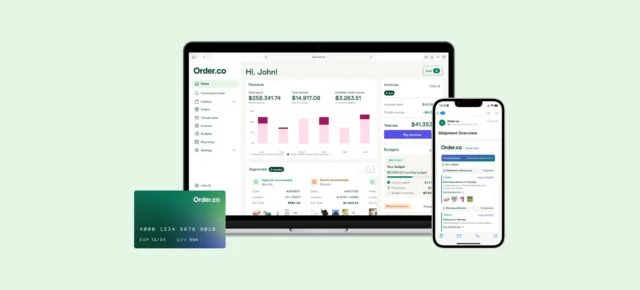
See how Order.co stacks up
Tour the product yourself now — no demo request, no waiting.
Easy for staff ordering supplies
Store managers, front-desk leads, and facilities coordinators order between other responsibilities, and they compare the experience with the retail sites they use at home. For this group, software is easy when ordering requires no knowledge of GL codes, cost centers, or approval chains.
The pattern that fits this group is an approved product catalog that staff search by product name. Order.co is built around this pattern: staff search a catalog, add items to a cart, and check out, while coding and budget are inherited from the user's location, so staff never enter them on a form. Coupa's guided buying takes a related approach, steering requesters toward approved channels.
Zip takes a different approach. Its single intake form handles any request type, which suits mixed spend. For repeat orders of known supplies, a catalog usually takes fewer steps than an intake form.
Easy for managers approving requests
For approvers, ease is measured in seconds per decision. A district manager reviewing requests from a dozen locations needs to see the item, the vendor, and the remaining budget on one screen, and needs to approve from a phone. Procurify is consistently strong here, and Precoro's approval flows are similarly simple to configure.
Routing logic determines how many decisions reach the manager at all. A well-built requisition approval workflow auto-approves routine orders within budget and escalates only the exceptions. Line-item editing lets an approver remove one item without sending the whole order back to the requester. Organizations that prioritize frontline ordering over approver speed often compare Procurify alternatives with deeper catalog and supplier coverage.
Easy for finance teams running reports and budgets
Finance measures ease by how little cleanup each purchase needs. A controller looks for three things:
- Each purchase arrives already coded to the correct entity, location, and GL account.
- Budgets reflect committed spend as well as paid invoices.
- Reports answer questions without an export to a spreadsheet.
Ramp performs well for card spend because transactions are categorized as they occur. Organizations whose spend runs largely through invoiced vendors often evaluate Ramp alternatives built around purchase orders. Coupa offers the deepest policy and reporting configuration in this group, and that depth comes with more administrative effort.
The common requirement is pre-invoice procurement control: coding and budget checks that run when the order is placed. With those checks in place, month-end close confirms data that is already structured, so the team does not have to rebuild it.
Easy for teams getting set up
Implementation is a separate measure of ease, and a demo rarely shows it. Precoro is known for working with little configuration for teams moving off spreadsheets and email. Teams that expect to add entities and locations often compare Precoro alternatives built for multi-location scale. Coupa sits at the other end, with implementations that typically need dedicated project resources. Zip's setup centers on intake forms and routing logic, and it moves faster when a single owner leads the design.
How to choose: test ease of use with real users
A demo rarely shows how a platform performs for every group. Run the same four-task test with real users in each finalist's demo:
- A frontline employee with no training finds and orders 5 routine items.
- An approver approves, edits, and rejects line items from a phone.
- A finance analyst pulls last month's spend by location and cost center without exporting.
- The vendor explains who builds catalogs, onboards suppliers, and configures approval rules, and how long each step takes.
Procurement typically owns the evaluation script. Finance signs off on tasks 3 and 4.
See how Order.co stacks up
Tour the product yourself now — no demo request, no waiting.
Why Order.co works for both frontline staff and finance teams
Order.co offers role-specific catalogs, so a custodian and an office administrator each see the products relevant to their work, and frequently purchased items can be reordered automatically on a set schedule.
Reviewers consistently rate it easy to use. Ease of use is the top-ranked advantage in G2's pros and cons summary for Order.co, with 54 mentions. Benjamin at The Yard described how staff add items from outside the catalog: "just copy the URL into Order.co so it can be purchased and tracked in one system. It takes seconds."
Order.co is built for indirect purchasing, like cleaning supplies, packaging, and office supplies, rather than direct production materials. Order.co states that most multi-location mid-market companies are running within 4 to 6 weeks, with core processes, ERP connections, and custom catalogs in place. The customer success team handles supplier onboarding and approval-rule configuration.
On the finance side, Order.co handles both the purchase and the payment, so the controls finance relies on run behind the checkout that staff see:
- Consolidated billing. Order.co pays the vendors and bills the organization back on a single, pre-coded invoice. Because coding attaches at the point of purchase, AP no longer performs three-way matching.
- ERP invoice sync. Line-level data flows to NetSuite, Sage Intacct, and Workday through the API. Finance works from the same purchase record as procurement, with no manual entry.
The easiest procurement software is the one every group will actually use: staff who can order quickly, approvers who can act on requests fast, and finance teams who get clean, coded data. For businesses buying supplies across many locations, Order.co is built to deliver all three.
Schedule a demo to see how it would work for your team.
FAQs
It depends on who is using it. Approvers need fast decisions from a phone, finance needs purchases that arrive already coded, and frontline staff need ordering that feels like online shopping. For staff ordering supplies across many locations, Order.co's catalog search and checkout is the most direct fit, because approvals, budgets, and coding happen in the background.
Non-finance employees find procurement software easy when ordering requires no accounting knowledge. The platform should offer an approved catalog searchable by product name and apply cost center, budget, and GL coding from the user's profile. It also needs a simple path for items outside the catalog. Order tracking in the same system cuts the follow-up emails that otherwise reach approvers and AP.
Procurement typically owns the requester and approver experience, because frontline adoption determines how much spend flows through the system. Finance owns the coding and reporting requirements and confirms that data reaches the ERP in usable form. The strongest evaluations score both groups on tasks performed by real users rather than on vendor-led walkthroughs.
Procurement software implementation timelines vary based on a few factors: the number of locations you’re onboarding, the complexity of your ERP integration, the size of your vendor catalog, and the number of steps and users required in your approval workflows. For most mid-market companies with multiple locations, Order.co gets core procurement processes, ERP connections, and custom catalogs up and running within 4-6 weeks. Order.co’s customer success team handles supplier onboarding and approval-rule configuration, minimizing the operational burden on your team.
Run the same four tasks with real users in each finalist's demo: a frontline employee orders routine items without training, an approver acts on requests from a phone, a finance analyst pulls spend by location without exporting, and the vendor explains who handles catalog, supplier, and approval-rule setup.
For repeat orders of known supplies, a catalog usually takes fewer steps, because staff search by product name and check out. An intake form handles any request type, which suits mixed spend such as software and services.